
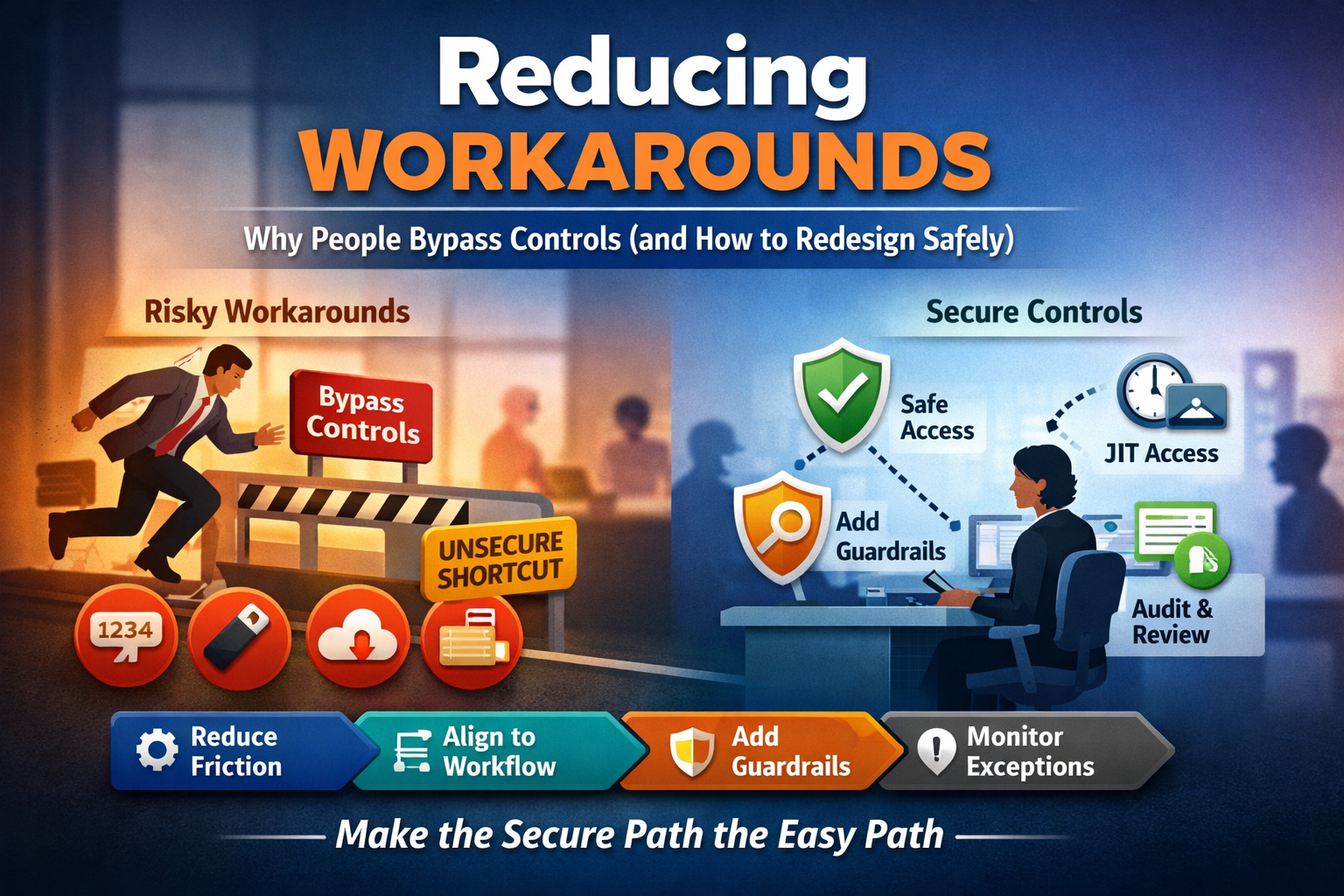
Why do people bypass security/compliance controls, and how do we redesign controls so work gets done without creating new risk?
People bypass controls when the control feels slower, harder, or less reliable than the “unofficial” way to get the job done, especially under time pressure. The safest fix usually isn’t “more enforcement.” It’s control redesign: reduce friction, align the control to the real workflow, make the secure path the easiest path, and add guardrails (monitoring, least privilege, break-glass, and auditability) so exceptions are visible and contained.
Workarounds aren’t a “people problem”, they’re a system signal
In real organizations, especially healthcare, finance, and operations-heavy environments, workarounds are rarely malicious. They’re a predictable outcome of:
- Mismatch between policy and reality (the process in the SOP isn’t the process people actually use)
- High consequence of delay (patient care, customer impact, deadlines)
- Tooling that doesn’t meet the need (access takes too long, approvals are inconsistent, systems time out)
- Hidden incentives (“get it done fast” is rewarded more than “get it done safely”)
A workaround is a form of feedback: “Your control doesn’t fit the job.” Treat it like a usability defect with security impact.
Depth: Why workarounds happen (the 7 most common drivers)
If you want to reduce bypass behavior, start by diagnosing why it’s happening. These are the patterns that show up over and over:
1) Latency and queueing
“I need access now.” If approvals take hours/days, people will share accounts, reuse credentials, or store data locally “temporarily” (and then permanently). Pre-approved role bundles, rapid self-service with audit trails, and time-bound access.
2) Reliability and downtime
Controls that break at the worst moment (SSO outages, MFA failures, VPN instability) teach people that “secure” equals “fragile.” Resilient authentication patterns (backup methods, documented break-glass), tested downtime procedures, and clear escalation paths.
3) Cognitive overload
If the secure workflow requires memorizing steps, switching systems, or re-entering data repeatedly, people will invent shortcuts. Reduce steps, integrate tools, use sensible defaults, and automate “paperwork” (tickets, logging, routing).
4) Wrong constraint at the wrong place
Controls often get placed where they are most visible, not where they are most effective. Example: strict DLP popups for every action, but weak privileged access controls. Move controls closer to the actual risk boundary (privilege, exfil paths, admin actions) and make low-risk tasks less annoying.
5) Conflicting goals and incentives
Managers may say “follow the policy,” but reward speed, throughput, and “hero fixes.” Align metrics: measure safe throughput, exception rates, rework, incident volume, and time-to-access (not just “tickets closed”).
6) Shadow tooling and “unofficial systems”
Teams adopt consumer tools because they solve workflow pain. Then policies try to block them after adoption, which drives hidden use. Offer an approved equivalent that is genuinely usable, and provide a pathway to onboard tools safely.
7) Culture of fear and blame
If reporting a workaround results in punishment, you’ll get silence, until an incident forces discovery. Treat workaround reporting like safety reporting (near-miss culture). Focus on redesign, not discipline, unless there’s willful misconduct.
A practical redesign framework: Make the secure path the easy path
If you want to reduce workarounds without slowing operations, use this sequence.
Step 1: Map the real workflow (not the documented one)
Don’t start with policy. Start with how the work actually happens.
- Who does the task?
- What triggers it?
- What systems/tools are used?
- Where do delays occur?
- Where do people “switch tracks” into a workaround?
Tip: Ask “Show me how you do it” instead of “Do you follow the process?”
Step 2: Classify the workaround by risk type
Not all workarounds are equal. Put each into a category:
- Identity workarounds: shared logins, borrowed badges, MFA fatigue
- Access workarounds: excessive permissions, local admin, “temporary” privileges
- Data handling workarounds: emailing files, personal cloud storage, screenshots, USB
- Process workarounds: skipping approvals, backdating, undocumented changes
- Monitoring workarounds: turning off logs/agents, using unmanaged devices
This helps you pick the right guardrails.
Step 3: Identify the friction point (and remove it)
Most redesign wins come from removing one or two friction points:
- reduce clicks/steps
- reduce wait time
- reduce re-entry of the same data
- remove “double approvals”
- make the control reliable
If the workaround saves 15 minutes every time, your redesign needs to win that time back (or at least narrow the gap).
Step 4: Add “safe speed” patterns (guardrails that enable flow)
These patterns reduce risk without blocking work:
Time-bound access (JIT/JEA): elevate only when needed, expire automatically.
Break-glass access: allowed in emergencies, heavily logged and reviewed.
Role-based bundles: pre-approved access packages mapped to real job duties.
Trusted device posture: allow smoother access on managed devices; step-up auth elsewhere.
Automation: create tickets/log entries automatically as part of the workflow.
Step 5: Make exceptions visible, reviewable, and temporary
Workarounds often become permanent because no one owns the exception backlog.
Operationalize exception handling:
- exceptions must have an owner
- exceptions must have an expiration date
- exceptions must have a compensating control
- exceptions must be reviewed on a schedule
A “temporary” bypass without an end date is just an undocumented design change.
What to measure if you actually want fewer workarounds
If you don’t measure it, you’ll only hear about workarounds after an incident.
Track a small set of leading indicators:
- Time-to-access (median and 90th percentile)
- Privilege elevation frequency and duration
- Exception count, age, and renewal rate
- Shadow tool discoveries (CASB/DLP findings, unmanaged apps)
- Helpdesk bypass signals (password resets, MFA failures, shared account requests)
- Near-miss reports (voluntary workaround reporting)
- Policy-to-practice gap (audit findings tied to workflow mismatch)
A meaningful goal is not “zero workarounds.” It’s fewer high-risk workarounds and faster redesign cycles.
Common redesign examples (before to after)
Shared admin password: named admin accounts, to JIT elevation, to session logging
Emailing files to self: secure file exchange, to short-lived links, to access logging
Using personal cloud storage: approved storage with easy sharing, to automatic classification rules
Skipping change approvals: lightweight “standard change” templates, to automation, to post-change review
Local copies of ePHI “temporarily”: virtual desktops / secure remote access, to device controls, to retention limits
Closing: Treat workarounds like a defect report, not insubordination
If smart, well-intentioned people keep bypassing a control, assume the control is misfit. The fastest route to safer operations is usually map the real workflow, remove the friction that causes bypass, and add guardrails that keep exceptions controlled and reviewable. That’s how you reduce risk and improve throughput, without turning compliance into a constant fight.


Leave a Reply